Best Budget Travel Apps and Tools for Travelers
Published: 19 Oct 2026
The right budget travel apps can save you real money before you even leave home. They help you find cheaper flights, book smarter stays, track every dollar, and skip costly transport mistakes. The trick is knowing which ones are worth the storage space on your phone.
This guide covers the most useful apps for flights, hotels, spending, food, and getting around. You will also find simple app “stacks” for backpackers, weekend trippers, families, and digital nomads. Prices and features change often, so check each app’s store page before you pay for anything.
Budget Travel Apps at a Glance
Here is a quick view of what each app does best.
| Category | App | Best For | Typical Cost |
| Flights | Google Flights | Comparing fares and tracking prices | Free |
| Flights | Hopper | Price predictions and alerts | Free to download |
| Flights | Skiplagged | Hidden-city fare searches | Free to search |
| Flights | Kiwi.com | Mixing airlines on one trip | Free to search |
| Stays | Hostelworld | Hostels and cheap private rooms | Free |
| Stays | HotelTonight | Last-minute hotel deals | Free |
| Stays | Booking.com | Free-cancellation hotels | Free |
| Stays | Trusted Housesitters | Free stays in exchange for pet care | Paid membership |
| Money | Trail Wallet | Simple daily budgets (iPhone) | Free with optional unlock |
| Money | TravelSpend | Trip budgets in any currency | Free with paid upgrade |
| Money | Splitwise | Splitting costs with others | Free core features |
| Food | Too Good To Go | Cheap surplus food bags | Free to use |
| Food | HappyCow | Vegan and vegetarian meals | Free to browse |
| Food | Google Maps | Price filters and offline maps | Free |
| Transport | Rome2Rio | Comparing routes and modes | Free |
| Transport | Omio | Train, bus, and ferry tickets | Free to search |
| Transport | Citymapper | City transit directions | Free |
Flight Booking and Price Tracking
Flights are often the biggest cost of a trip. A few smart tools can bring that number down.
Google Flights
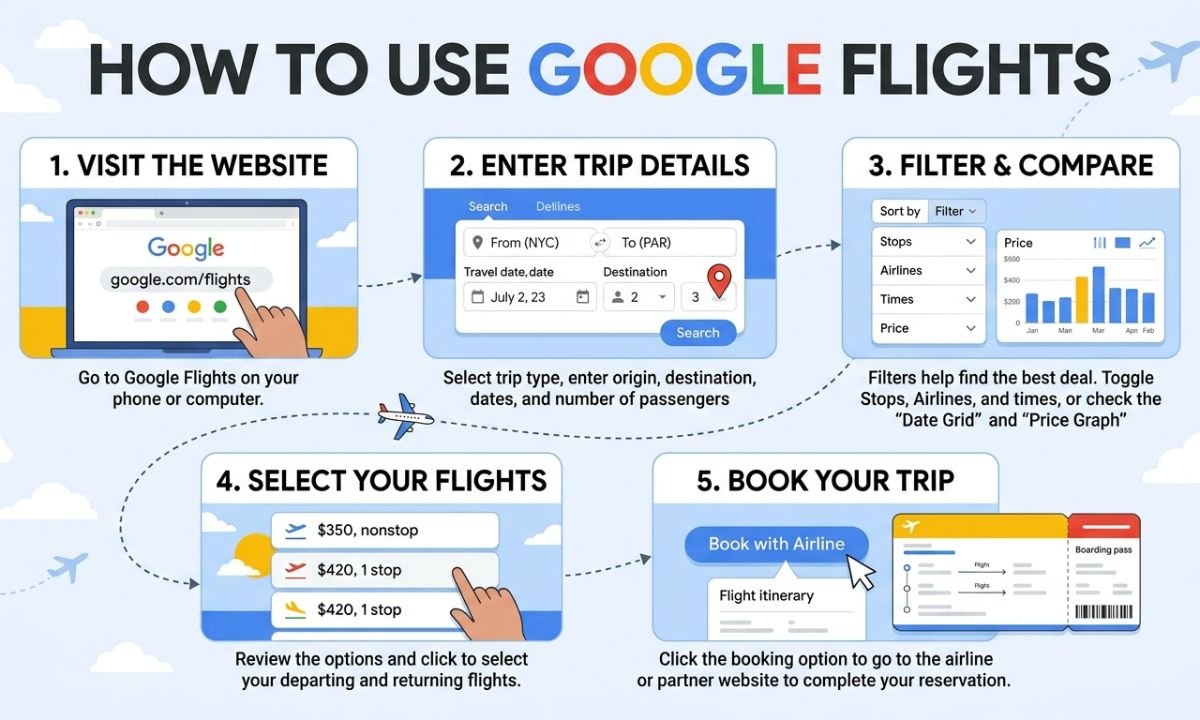
Google Flights is the best place to start. It shows fares from many airlines in one clean view. You can scan a calendar or price graph to see which days cost less.
You can also turn on price tracking. Google emails you when the fare changes. This helps you avoid guessing when to book.
Try the “Explore” map when your dates are flexible. Enter your home airport and see which destinations are cheapest.
Hopper
Hopper focuses on predicting prices. It tells you whether a fare is likely to rise or fall, so you can decide whether to buy now or wait. It also sends alerts for routes you follow.
Treat predictions as a guide, not a promise. Some extra features, such as fare locks, may cost money. Read the terms before paying for add-ons.
Skiplagged
Skiplagged finds “hidden-city” fares. You book a flight with a layover in your real destination city, then skip the final leg. Sometimes this costs less than a direct ticket.
It carries real risk. Most airlines prohibit this practice, and violators can have tickets canceled or be barred from flying. Other risks include unexpected bills, lost frequent flyer miles, and even a ban from the airline.
If you try it, follow these rules:
- Travel with carry-on bags only.
- Book one-way tickets, because skipping a leg usually cancels the rest.
- Do not link the booking to your loyalty account.
For families, the risk is usually not worth it. A canceled flight with children costs far more than the savings.
Kiwi.com
Kiwi.com can combine flights from different airlines into one trip. This sometimes finds routes that normal search sites miss, especially with budget carriers.
The catch is protection. If one airline is late, the next airline may not rebook you. Leave generous time between connections and consider travel insurance. Kiwi has also faced pushback from airlines over its ticketing methods. American Airlines sued Kiwi in federal court, alleging abusive ticketing practices.
Accommodation
Where you sleep is the next big expense. These apps cover everything from dorm beds to free housesits.
Hostelworld
Hostelworld is a free booking app for hostels. Hostels are not only for solo backpackers. Many offer private rooms and family rooms at a lower price than hotels.
Read the recent reviews and check the location. A cheap bed far from the city center can cost more in daily transport.
HotelTonight
HotelTonight is built for last-minute bookings. Hotels use it to fill unsold rooms, so you may find lower rates on the same day. It works best for flexible travelers and short stays.
Do not rely on it during busy seasons or major events. Rooms can sell out or cost more.
Booking.com
Booking.com has one of the largest hotel and apartment selections. Its best budget feature is the free-cancellation filter. You can book early, then cancel if you find a better price.
Always check the final price. Cleaning fees and local taxes can change the total. Look at the full cost before you confirm.
Trusted Housesitters
Trusted Housesitters connects pet owners with travelers who will care for pets and homes. You stay for free in exchange for your time. The cost is a yearly membership.
Sitter plans have been listed at $129, $169, and $259 per year. Check the current price on the official site.
It works well for long trips or slow travel. It suits families less often, since many listings are better for adults. Read each listing’s rules.
Budgeting and Expense Tracking
Spending leaks are easy to miss on the road. A budget app shows you where your money goes.
Trail Wallet
Trail Wallet is a simple iPhone app. You set a daily budget, log your spending, and see how much you have left. The first 25 entries are free, and an in-app purchase unlocks unlimited entries.
It is iPhone only, and the design is basic. For many travelers, that simplicity is the point.
TravelSpend
TravelSpend works on both iPhone and Android. You log expenses in any currency, and the app converts them for you. The free version is enough for most travelers, while the premium version removes ads and adds data export.
It is a good pick if you want to compare your real spending with your plan.
Splitwise: Best App for Travel Expenses With Friends
Splitwise is the easiest way to share costs with a group. One person pays for dinner. Everyone logs it, and the app tracks who owes what.
At the end of the trip, you settle up in a few taps. No more awkward math at the airport. Core features are free, and a paid tier adds extras.
Food and Dining
Food can quietly eat your budget. These tools help you eat well for less.
Too Good To Go
Too Good To Go sells “Surprise Bags” of unsold food from cafes, bakeries, and stores. Users pay about one-third of the retail price on average, then pick up the bag at a set time.
You do not choose what is inside. That is part of the fun. It works best for snacks, pastries, and picnic food. Availability depends on the country and city, so check the app before you travel.
HappyCow
HappyCow lists vegan and vegetarian restaurants around the world. It is useful for anyone with dietary needs, not just vegetarians. Browsing is free.
Check reviews for recent dates. Small restaurants change hours and menus often.
Google Maps (Underrated for Food)
Google Maps is one of the best food-budget tools. Filter restaurants by price level. Read recent reviews. Look at photos of real dishes.
Here are a few smart habits:
- Save places to a list before you travel.
- Download offline maps to avoid roaming data.
- Look for busy local spots away from tourist streets.
Transport
Getting around can cost more than you expect. The right app prevents expensive mistakes.
Rome2Rio
Rome2Rio compares ways to get from one place to another. Enter two locations and see train, bus, ferry, and flight options with rough costs and travel times. It is great for early planning.
Use it for ideas, then confirm the final price with the transport provider.
Omio (formerly GoEuro)
Omio lets you search and buy train, bus, and ferry tickets in one app. It is especially useful in Europe. You can compare prices across operators without visiting many sites.
Check the booking fee and compare with the operator’s own site. Sometimes booking direct is cheaper.
Citymapper
Citymapper gives step-by-step public transit directions in supported cities. It shows which line to take and when the next one leaves. This helps you avoid expensive taxis.
Coverage is limited to certain cities, so check that your destination is included.
The Budget Travel Tech Stack: What to Actually Install
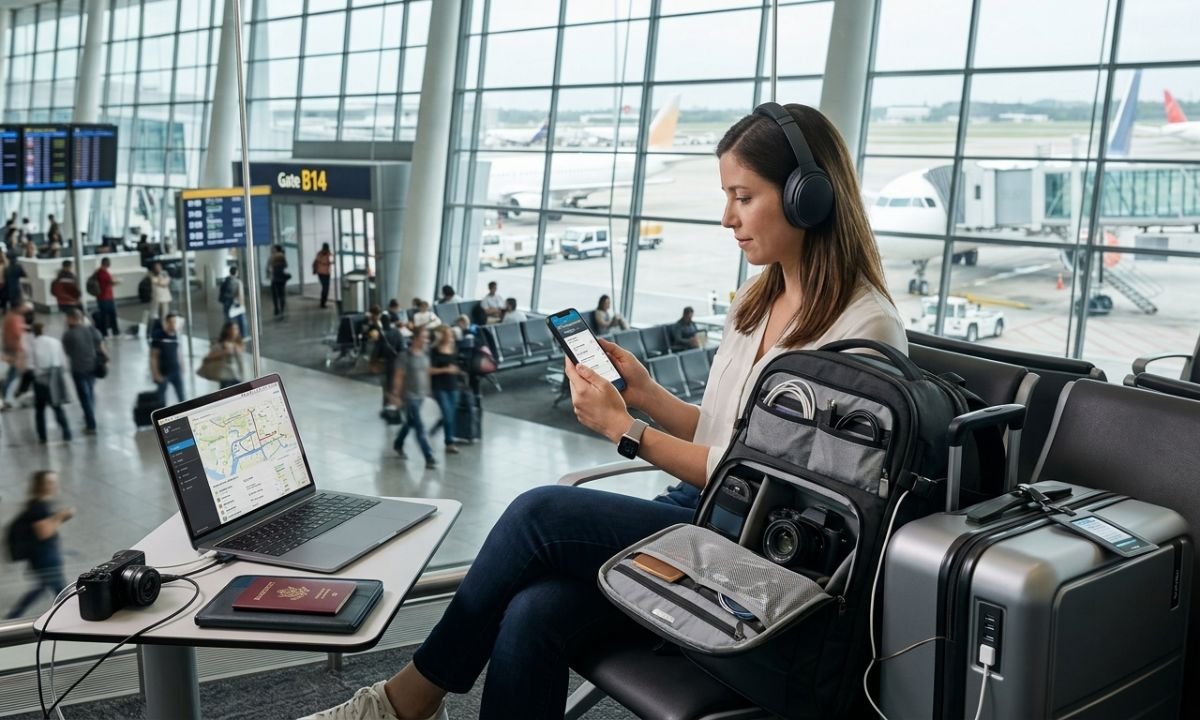
More apps do not mean more savings. Too many apps waste storage and attention. Pick a small set that fits your trip.
| Stack | Apps | Estimated Cost |
| Backpacker | Google Flights, Hostelworld, TravelSpend, Too Good To Go, Rome2Rio, Google Maps | Free |
| Weekend Tripper | Google Flights, Booking.com, Splitwise, Google Maps, Citymapper | Free |
| Family Traveler | Google Flights, Booking.com, TravelSpend or Trail Wallet, Too Good To Go, Google Maps | Free to about $5 |
| Digital Nomad | Google Flights, Hostelworld, TravelSpend, Omio, Trusted Housesitters | Free to about $130 per year |
The Backpacker Stack (Free)
Backpackers need low costs and flexibility. Use Google Flights for fares and Hostelworld for beds. Add Travel Spend to track daily spending.
Use Rome2Rio to plan overland routes. Keep Too Good To Go for cheap meals. Download offline maps in Google Maps before you leave Wi-Fi.
The Weekend Tripper Stack (Free)
A short trip needs speed and low stress. Book flights with Google Flights, and choose a hotel on Booking.com with free cancellation.
Use Splitwise if you travel with friends. Citymapper handles local transit. Google Maps covers food and walking routes.
The Family Traveler Stack (Free-$5)
Families need predictability. Use Google Flights alerts to catch good fares. Book a free-cancellation stay on Booking.com so you can adjust plans.
Track your spending with TravelSpend or Trail Wallet. Trail Wallet’s unlock is a small one-time cost, so check the App Store for the current price. Skip risky tricks like hidden-city tickets.
Add Too Good To Go for cheap snacks and Google Maps for kid-friendly food and offline directions.
The Digital Nomad Stack (Free-$130/year)
Long-term travelers care about monthly costs. Use Google Flights for routes and Hostelworld for short stays. Use Omio for overland trips in Europe.
Track expenses in TravelSpend. If you like pets, a Trusted Housesitters plan can replace weeks of rent. The cheapest sitter tier has been listed around $129 per year, so confirm the current price before joining.
Common Mistakes With Budget Travel Apps
Even the best budget travel apps can backfire if you use them wrong. Avoid these mistakes:
- Chasing the lowest fare only. Add baggage fees and transport to the airport before you decide.
- Skipping cancellation terms. A cheap, non-refundable room is risky if your plans might change.
- Ignoring roaming costs. Download offline maps and tickets before you leave Wi-Fi.
- Using risky tricks with kids. Hidden-city flights and tight self-transfers can strand a family.
- Installing too many apps. Choose a small stack and learn it well.
- Forgetting to log spending. Track daily, not at the end of the trip.
Conclusion
Saving money on the road comes down to a few smart choices. Use Google Flights to find fares and Booking.com or Hostelworld to lock in stays. Track spending with TravelSpend or Trail Wallet, and eat well with Too Good To Go and Google Maps.
Start with a small stack that matches your trip. Test the apps at home first. The best budget travel apps are the ones you actually open, so keep it simple and let them do the work.
Frequently Asked Questions
What is the best app for finding cheap flights?
Google Flights is the best starting point for most travelers. It compares many airlines, shows a price calendar, and sends alerts when fares change. Hopper is a good second option for price predictions.
Which budget travel apps are completely free?
Google Flights, Google Maps, Rome2Rio, Hostelworld, and Booking.com are free to use. TravelSpend and Splitwise are free for core features. Some have paid upgrades, so check before you subscribe.
Is Skiplagged safe to use?
It is not illegal, but most airlines ban the practice in their terms. You could face a canceled ticket or lost miles. Use carry-on bags only, book one-way, and avoid it when traveling with children.
What is the best app for splitting travel costs with friends?
Splitwise is a popular choice. Everyone logs expenses, and the app shows who owes whom. It makes settling up at the end of a trip simple.
How can I save money on food while traveling?
Use Google Maps price filters and read recent reviews. Try Too Good To Go where it is available. Buy groceries for breakfast and picnics, and eat your main meal at local spots away from tourist areas.
Do budget travel apps work offline?
Some do. Google Maps lets you download maps ahead of time. Save tickets and booking confirmations to your phone before you go. Expense apps often store entries locally and sync later, but confirm this for the app you choose.
Is house sitting a good option for families?
It can work, but it is not always easy. Many listings suit adults or couples. Read each listing’s rules, and be honest about who is traveling with you.






- Be Respectful
- Stay Relevant
- Stay Positive
- True Feedback
- Encourage Discussion
- Avoid Spamming
- No Fake News
- Don't Copy-Paste
- No Personal Attacks
- Be Respectful
- Stay Relevant
- Stay Positive
- True Feedback
- Encourage Discussion
- Avoid Spamming
- No Fake News
- Don't Copy-Paste
- No Personal Attacks
